


Dice Tech Careers
4.31.71K Reviews
App Specs
- Version
- 4.3
- Updated On
- License
- Free
- Downloads
- 500,000+
- Developer
- DHI Group Inc.
- Categories
- Business
- Platform
- Android
Screenshots
 Analysis by AppCompare
Looking for a technology job from a phone sounds simple, but the quality of the experience depends on much more than the number of listings. Search needs to be readable, filters need to make sense, and applying should not become a frustrating task when you are commuting, using a smaller screen, or working with a different input method. I spent time with Dice Tech Careers, a free business app from DHI Group Inc., to see how well it supports that everyday job-search routine.
The app is aimed specifically at people searching for tech roles across the United States. That focus is its biggest advantage: instead of mixing software, support, data, and infrastructure positions into a general employment marketplace, it gives technology work the central place. Its public store rating is 4.3 from around 6,400 ratings, and its reach is substantial, with over 500,000 installs. Those figures suggest that it has become a familiar option for mobile tech-job searches, although popularity alone does not make every part of the experience equally comfortable.
How the app feels to read and navigate
I look at how the app’s screen layout and reading flow shape a real search, especially when technical listings are dense. I’ll also consider a practical way to keep the first pass focused: decide in advance which role terms and locations matter, then compare results against that short list rather than browsing by impulse.
A focused starting point for technology searches
My first impression is that Dice Tech Careers makes more sense for a technical professional than a broad job-board app does. The purpose is clear from the beginning: find relevant technology openings, inspect them, and decide whether to apply. That narrower purpose reduces the noise you often encounter in general employment apps, where a search for a familiar role can bring up unrelated office, sales, or administrative positions.
The focused approach also changes how I would use it. I would not open it casually and browse every kind of work. I would use it with a target in mind, such as looking for a new development role, checking opportunities in a particular US location, or comparing openings after updating my résumé. That makes the app feel more like a practical search tool than a general career community.
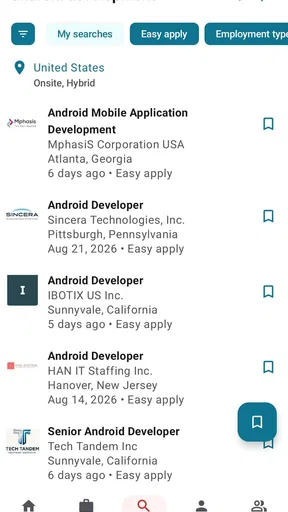
Readable job information matters especially when a listing contains a long technology stack, several requirements, and a detailed description of the employer. On a phone, dense text can quickly become tiring. I found it more useful to scan the role title and the most relevant details first, then decide whether the complete posting deserved my attention. This is a good habit with any mobile job board, but it is particularly valuable here because technical listings can contain many abbreviations and closely related skills.
Why short search sessions work better
I would recommend using the app in short, deliberate sessions rather than endlessly scrolling. Start with the role you actually want, narrow the search to a sensible location, and read each promising result far enough to identify the real requirements. This prevents a common mobile mistake: applying simply because the title looks familiar before checking whether the position matches your experience or working situation.
Worth Reading Before You Choose

EA SPORTS FC Mobile 26 Is a Bigger Football Game, but It Takes Time

Flipboard Shows What News Apps Must Do Beyond the Feed

Switching to Android Auto Means Rethinking Your Driving Routine

Google Calendar Makes a Crowded Week Easier to Manage

Ludo King Makes the Most of the Minutes Between Plans

Baby Panda World Brings Quick Play to Modern Phones, but Its Game Library Feels Busy
A useful workflow is to separate discovery from decision-making. During a quick break, I might search and note interesting openings. Later, with more time and a larger screen if necessary, I would review the full requirements and prepare an application. This is one of the app's practical strengths: it can help you keep the search moving when your day is busy, even if it should not replace careful reading before submitting professional information.
Its current version is 4.3, and the app supports devices running iOS 11 or later. That broad operating-system coverage can help people using older compatible hardware, but device age still affects the experience in ways a version number cannot fully describe. A small display, slower performance, or an outdated keyboard may make long job descriptions and form entry less comfortable than they would be on a newer phone.
Navigation through the lens of different abilities
For users with low vision, the most important question is not simply whether the app opens, but whether job titles, locations, requirements, and actions remain easy to distinguish. I would increase the phone's text size before beginning a serious search and check whether the layout still feels manageable. Enlarged text can improve comfort, but it can also make a page require more scrolling, so there is a real trade-off between seeing larger content and keeping the surrounding context visible.
People who rely on screen readers should test the main tasks early: starting a search, moving through results, opening a listing, and reaching the application action. I cannot treat the app as universally accessible for every assistive technology without testing each device configuration, so I would not make that assumption. The sensible approach is to try one complete search before investing time in a long application workflow.
Users with dyslexia or other reading-related needs may benefit from slowing down the process and using the phone's available display settings. Technical job descriptions are inherently vocabulary-heavy, and the app cannot remove the need to understand terms such as frameworks, platforms, certifications, or infrastructure tools. I would copy unfamiliar requirements into a separate note and compare them with my actual experience instead of trying to decode everything while rushing through a listing.
Access in real situations, and where the friction remains
Convenience matters most when a search has to fit around work, travel, or limited energy, so I weigh what is realistic to do on a phone against what deserves a calmer setting. I’ll focus on making each session useful without turning repeated checking into a chore, and on the points where a broader job-search tool or desktop workflow may serve you better.
Using it while commuting or between tasks
A realistic scenario is a developer checking openings during a lunch break. The app is well suited to that first pass: search for a role, inspect the headline details, and decide which listings deserve a closer look later. The same applies to someone between interviews who wants to check whether a newly discovered employer has other relevant positions. A phone-based search is more convenient than waiting until a computer is available, especially when the goal is simply to keep track of possibilities.
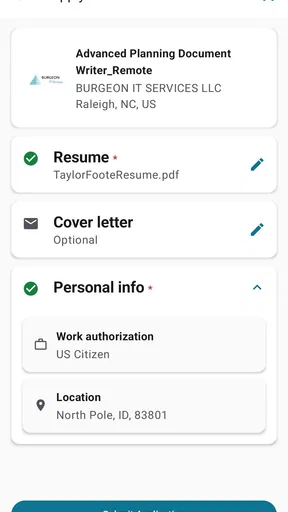
However, I would avoid completing an important application in a noisy train station, a crowded bus, or any place where concentration is limited. A job application is not just a tap on a listing. It may require careful answers, résumé selection, and checking personal details. If your hands are occupied, your connection is unreliable, or you are frequently interrupted, the app is better used for research than for the final submission.
This distinction is important for people with different energy, attention, or communication needs. A short search can be manageable during a demanding day, while reading every condition and writing a thoughtful application may require a quiet environment. I like that the app supports the first stage of that process, but I would plan the second stage rather than forcing everything into one mobile session.
Motor and sensory considerations
Job searching involves repeated taps, scrolling, text entry, and sometimes switching between the listing and other documents. Anyone with limited dexterity, tremors, repetitive-strain concerns, or difficulty maintaining a precise touch target may find this tiring over a long session. I would search in batches, pause between results, and avoid repeatedly opening listings that clearly do not match the role or location.
Voice input can be useful for entering search terms or notes when typing is uncomfortable, but it is worth checking every dictated field carefully. Technology names are easy for speech recognition to misinterpret, particularly when they contain acronyms, product names, or similar-sounding words. I would treat dictation as a shortcut for the first draft of a query, not as a guarantee that the final search phrase is correct.
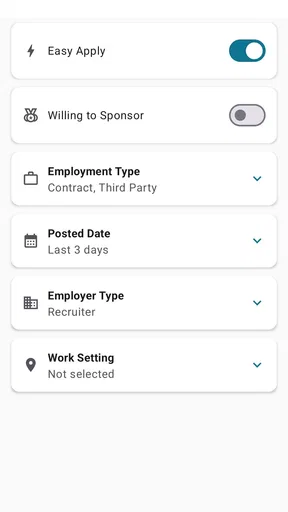
For users sensitive to visual clutter, the best strategy is to reduce the number of simultaneous decisions. Rather than changing several filters at once, I would begin with the role and location, review the results, and then refine only if the list is too broad. This creates a calmer workflow and makes it easier to understand why a result appeared or disappeared.
People who are sensitive to interruptions may also prefer to prepare before opening the app. Keep the preferred job title, target locations, and a short list of must-have requirements in a note. That turns the search into a repeatable checklist instead of an open-ended browsing session. It is a small adjustment, but it helps prevent fatigue and makes the app more useful for users who need predictable steps.
Comparing it with broader job-search alternatives
Compared with a general employment marketplace, Dice Tech Careers has a clear specialist identity. That is helpful when your search is genuinely technical, because the context is more relevant from the start. A broad service may be better if you are considering a career change into a nontechnical field, searching across several industries, or looking for a mix of office, freelance, and technology work in one place.
A desktop browser can also be the better alternative when you need to compare several descriptions side by side, edit a résumé, or write detailed application responses. The mobile app wins on availability and convenience, not on replacing every part of a full career-search workstation. I see it as a companion for discovery and follow-up, while a larger screen remains more comfortable for careful comparison.
Its US technology focus is another practical boundary. If you are searching outside the United States, or if location flexibility is the central issue, you should confirm that the results fit your plans before spending time on applications. Likewise, someone seeking highly specialized work outside the technology field may get more useful coverage from a broader service.
Barriers that can still affect inclusion
The biggest remaining barrier is not necessarily finding a listing; it is completing the entire process comfortably. Long descriptions, technical terminology, repeated scrolling, and form entry can create a cumulative burden. That burden is higher for people who use larger text, alternative input methods, or frequent breaks. The app can make discovery more convenient, but it cannot remove the complexity of the hiring process itself.
Another limitation is the risk of treating a mobile result as a complete picture of the market. Search results reflect the terms you use, so an overly narrow phrase may hide roles described with different titles. I would run a few related searches rather than relying on one exact wording. For example, a person looking for a particular development specialty should also consider adjacent titles that may describe similar work differently.
There is also a human judgment barrier. A polished listing can still be a poor match for your experience, schedule, location, or preferred working environment. I would verify the details that matter most to me before applying and keep a simple record of roles already reviewed. That avoids duplicate effort and makes it easier to remember why a position was rejected or saved for later.
The app is free and rated for Everyone, which makes it approachable for a wide audience. Still, an age rating should not be confused with a promise that every job-search task will be equally easy for every person. Accessibility depends on the phone, operating-system settings, assistive tools, listing design, and the user's own needs. I appreciate the low barrier to trying it, but I would judge the experience through a complete task rather than the label alone.
Who will get the most from it?
I think Dice Tech Careers is strongest for an active technology professional who wants a focused way to discover US openings from a phone. It is also useful for students or early-career applicants who are learning how technical job titles differ, provided they read requirements carefully and do not assume that every familiar keyword represents an entry-level opportunity.
It can help a passive candidate too. Someone who is not ready to resign but wants to understand what employers are asking for can use short searches to identify recurring skills and role names. I would turn those observations into a learning plan rather than applying immediately to everything. The app becomes more valuable when it supports a decision, not when it encourages indiscriminate applications.
I would skip it as a primary tool if your search is international, mainly nontechnical, or dependent on advanced résumé editing and detailed comparison. I would also choose a desktop-first workflow if typing on a phone is painful or if you need to review many conditions at once. In those cases, the app may still be useful for quick discovery, but it should not be the center of the process.
My inclusive verdict
After using it as a mobile job-search tool, I see Dice Tech Careers as a practical specialist option with a clear purpose. Its focus on US technology roles makes searching more direct than using a general employment app, and its free availability makes it easy to test without committing to a paid service. The developer, DHI Group Inc., has kept the product centered on the task most relevant to its audience: finding and pursuing tech opportunities.
My main recommendation is to use it as a structured discovery tool, not as a substitute for thoughtful application work. Search in short sessions, adjust display settings to suit your vision, use voice input carefully if typing is difficult, and move demanding application steps to a quieter setting or larger screen. Those habits make the experience more inclusive without pretending that one interface can solve every access need.
For a US-based technology job seeker who values mobile convenience, I would recommend giving it a try. For someone with international ambitions, a nontechnical career target, or substantial motor and reading barriers, I would test the complete search-and-apply journey before relying on it. Overall, Dice Tech Careers earns its place as a focused companion for tech careers: useful, approachable, and most effective when paired with deliberate reading and a workflow adapted to the way you work.
Pros
- Simple way to browse Dice technology job listings
- Useful filters help narrow results by role and location
- Career-focused content can support technology job searches
- Listings may include remote and flexible work opportunities
- Helpful for candidates exploring specialized tech positions
Cons
- Job availability can vary significantly by location and specialty
- Some listings may redirect you to external application pages
- Certain features may require creating or linking an account
- Search results can include expired or recently filled positions
- The app may be less useful outside the technology sector
FAQs for Dice Tech Careers
What is Dice Tech Careers?
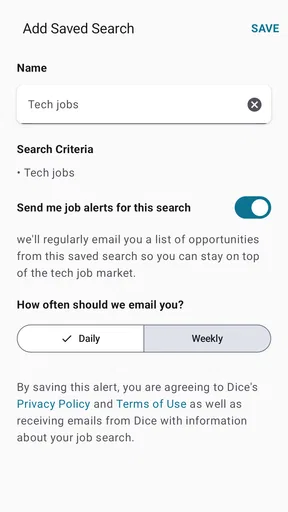
Dice Tech Careers is a career-focused platform designed to help technology professionals discover job opportunities, explore employers, and manage their job search. It is aimed at people looking for roles in software development, IT, data, cybersecurity, engineering, and other technical fields. The app or service may also provide career-related information, job alerts, and tools for connecting with potential employers.
Can I search for technology jobs based on my skills and location?
Yes, the main purpose of Dice Tech Careers is to make technical job searching more targeted. Users can typically search by job title, programming language, specialization, company, experience level, and location. Depending on the available filters, you may also be able to look for remote, hybrid, contract, or full-time positions, making it easier to narrow results to opportunities that match your professional goals.
Do I need an account to use Dice Tech Careers?
You may be able to browse some job listings without creating an account, but registering is generally useful if you want to save vacancies, receive personalized recommendations, create or manage a professional profile, and apply more conveniently. An account can also help synchronize your activity across supported devices. Before signing up, review the requested permissions and privacy information to understand how your data will be used.
Is Dice Tech Careers free to download and use?
Access to job-search features is generally free for candidates, although availability can vary depending on the version, platform, or service region. Some features may require registration, while employers or recruitment partners may use separate paid services. It is worth checking the official Google Play Store or Apple App Store listing for current pricing, in-app purchase information, and any limitations before downloading.
Is Dice Tech Careers safe for applying to jobs?
The platform can be useful for discovering technology vacancies, but users should still evaluate every listing and recruiter carefully. Avoid sharing sensitive information such as banking details, passwords, or identity documents during an early application stage. Check that communication comes from a legitimate company domain, research the employer independently, and be cautious of requests for payment, unusual messaging-app contact, or guaranteed-job promises.


